What is the difference between sales and proceeds in App Store Connect?
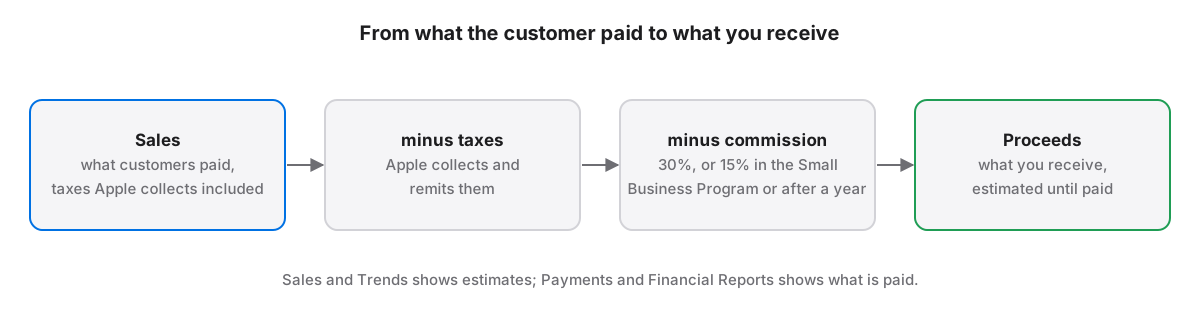
In App Store Connect, sales is the amount customers paid, including taxes Apple collects, and proceeds is what you receive after those taxes and Apple's commission. Sales and Trends shows both as US dollar estimates; the amounts actually paid out appear later in Payments and Financial Reports, at the exchange rate Apple uses for your bank.
Sales and proceeds measure two different amounts. Sales is the customer side of a transaction and includes tax; proceeds is your side, after tax and commission. Both figures in Sales and Trends are estimates, so neither one is guaranteed to equal the deposit in your bank account. The differences follow a few rules Apple documents, plus some report details Apple leaves out.
What does Apple count as sales and as proceeds?
Apple defines sales as the total amount billed to customers for apps, app bundles and in-app purchases, including the taxes Apple collects and remits. Proceeds are the customer price minus those taxes and Apple's commission. For a subscription, the commission falls from 30% to 15% once a subscriber has paid for a full year.
The definitions come from Apple’s help page on units, proceeds and sales. Apple calls the subscription split the Rate Before One Year, 70% of the price excluding tax, and the Rate After One Year, 85%. Developers in the App Store Small Business Program pay a 15% commission on everything, so for them the two rates converge.
Units are a separate count. An app unit is a first-time purchase or download; updates, redownloads and installs on another device of the same Apple Account are excluded. Family Sharing downloads count as units for free apps but not for paid ones.
Why don't Sales and Trends and your payments match?
Sales and Trends and Payments and Financial Reports disagree because Sales and Trends converts every sale to US dollars at a rolling average of the previous month's exchange rates, while payments use the rate applied when Apple pays you. A transaction can also appear only after the customer's payment is collected, sometimes in the next fiscal month.
Apple lists these causes on its differences in reporting tools page. Transactions whose payment Apple never collects do not appear in financial reports at all. Treat Sales and Trends as a fast trend line and Payments and Financial Reports as the ledger.
Why do App Analytics and Sales and Trends disagree?
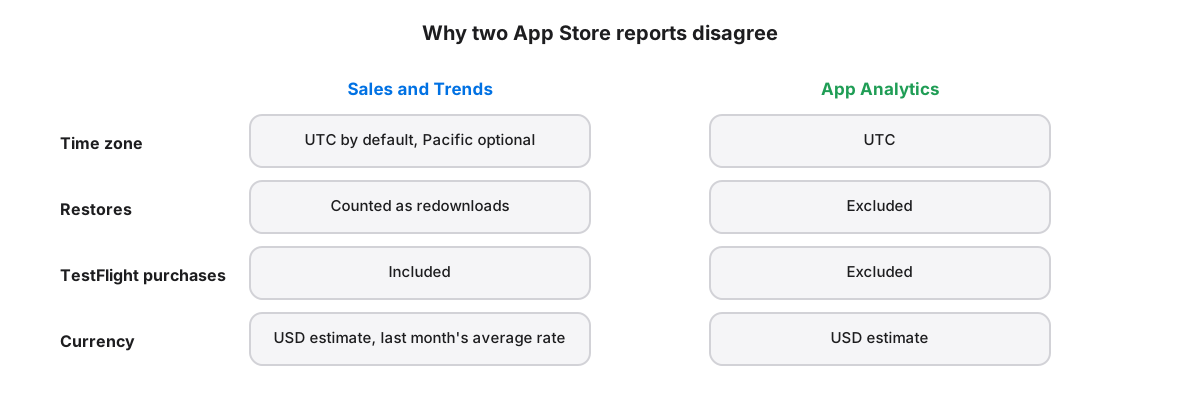
App Analytics and Sales and Trends count differently: App Analytics uses Coordinated Universal Time, excludes restores from redownloads, and excludes TestFlight purchases, watchOS sales and renewals from apps removed from sale. Sales and Trends includes all of those and shows UTC by default, with Pacific Time as an option.
Downloaded sales reports use Pacific Time, so set Sales and Trends to Pacific Time before comparing it with a report file. A day there runs from midnight to 11:59 p.m. in the chosen zone, and a single midnight boundary is enough to move a launch-day spike from one date to the next.
How do you read proceeds from the daily sales report?
The daily sales summary lists proceeds per unit in a Developer Proceeds column, in the currency of each row, so multiply by the Units column before adding anything up. In-app purchase rows carry the app's SKU in Parent Identifier rather than the app's Apple ID, so filtering by Apple ID alone drops them.
First-time downloads are the rows whose Product Type Identifier is 1, 1F, 1T, F1, 1E, 1EP or 1EU; updates and redownloads use other codes. App Store Localization for Mac sums those rows per day and territory, and its September total for one of our apps, 1,157 first-time downloads, matched Apple's monthly report exactly.
Daily units already net out processed refunds, so a refund can make a day negative. A daily report can also arrive late: the app asks again for missing days and only records a day as empty once it is still missing four days later.
Which role can read App Store sales reports?
Apple's role table gives Sales and Trends, sales reports and App Analytics to the Account Holder, Admin, Finance and Sales roles, and payments and financial reports to the Account Holder, Admin and Finance only. An App Manager key is refused sales reports, and individual API keys cannot use the Sales and Finance endpoints at all.
The permissions are in Apple’s developer program roles, and the API rule is in Apple’s guide to creating API keys. Sales reports through the API also need your vendor number, shown in Payments and Financial Reports. The roles in detail are in which role an App Store Connect API key should have.
App Store Localization for Mac reads and plans every change for free; a one-time license applies them. macOS 26 or later.
Key takeaways
- Sales is what customers paid including collected tax; proceeds is what you keep after tax and commission.
- Subscription commission drops from 30% to 15% after a subscriber's first paid year.
- Sales and Trends uses last month's average exchange rate, so its proceeds may differ from your payment.
- Compare reports in Pacific Time, and multiply Developer Proceeds by Units in the daily file.
- In-app purchase rows point to the app through its SKU in Parent Identifier, not its Apple ID.
Frequently asked questions
Are App Store Connect sales numbers before or after tax?
Sales in App Store Connect include the taxes Apple collects and remits, because sales is the total amount billed to customers. Proceeds are after tax and after Apple's commission. If you want to know what reaches your bank, use proceeds, and confirm the final figure in Payments and Financial Reports.
Why are my proceeds different from my Apple payment?
Proceeds in Sales and Trends are estimates converted to US dollars at the previous month's average exchange rate. Apple pays at the rate applied for your bank's currency, and some transactions only appear after the customer's payment is collected, sometimes in the following fiscal month. Small differences are expected.
Does App Store Connect count redownloads as units?
No. A unit is a first-time purchase or download. Updates, redownloads and installs on another device signed in to the same Apple Account are excluded by default, though Sales and Trends can show them through filters. Family Sharing downloads count for free apps only.