Which role should an App Store Connect API key have?
Give an App Store Connect API key the narrowest role that covers its job. App Manager can edit metadata, pricing and submissions but cannot read sales or App Analytics; Finance and Sales read reports; Admin does everything, including creating and deleting users. The API never tells a key its own role, so test each area and read the 403s.
An App Store Connect API key gets exactly one role, and the role decides which endpoints answer. Team keys reach every app in the account whatever their role, so the role is the only boundary a key has. Picking it well matters most for automation, where a key sits in a CI secret store or on a laptop.
What can each App Store Connect role do?
Apple's role table lets Admin and App Manager edit pricing, answer App Review and edit App Store details. Admin, Finance and Sales can view sales and App Analytics; only Admin and Finance see payments. Replying to customer reviews belongs to Admin and Customer Support. Developer holds none of the pricing or report permissions in this table.
Selected rows from the table, with the Account Holder left out because it holds every permission:
| Task | Admin | App Manager | Developer | Finance | Sales | Customer Support |
|---|---|---|---|---|---|---|
| Edit app pricing and availability | Yes | Yes | ||||
| Respond to App Review | Yes | Yes | ||||
| Respond to customer reviews | Yes | Yes | ||||
| View sales and trends | Yes | Yes | Yes | |||
| View app analytics | Yes | Yes | Yes | |||
| View payments and financial reports | Yes | Yes |
Source: Apple Developer Program roles. The Developer role's permissions sit mostly in Certificates, Identifiers and Profiles and TestFlight, which this table leaves out.
How do you test what an API key can do?
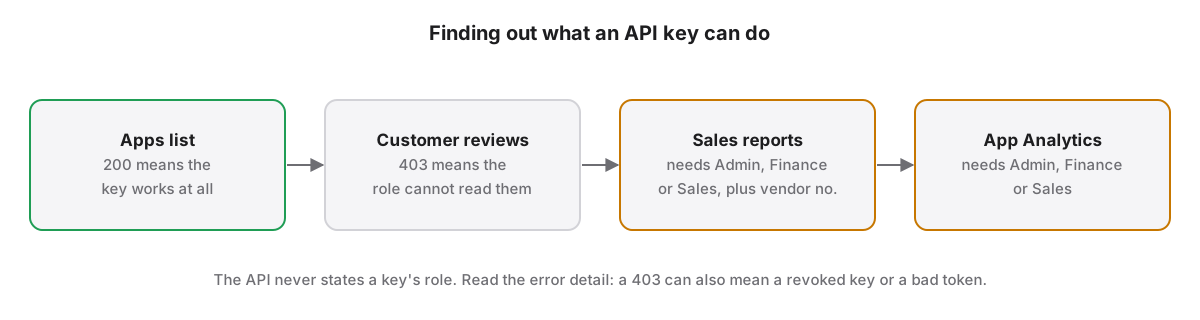
Test an App Store Connect API key by calling one endpoint per area and reading the response. A 401 is an authentication failure. A 403 is a forbidden request, which Apple says can mean a revoked key, a malformed token or an operation the role does not allow. No endpoint returns a key's own role.
App Store Localization for Mac probes four areas when a key is added: the apps list, customer reviews, sales reports and App Analytics. Measured on our own account, an App Manager key read apps and reviews and was refused sales reports and App Analytics; an Admin key read all four. A missing vendor number fails differently from a missing role, so the app asks for the vendor number separately.
Why use two narrow keys instead of one Admin key?
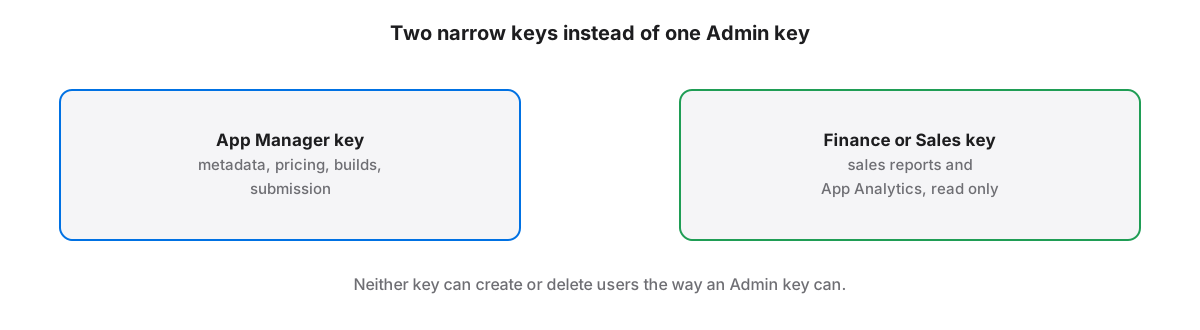
An Admin API key can create and delete users in App Store Connect, so a leaked Admin key exposes the whole team, not only the apps. Pairing an App Manager key for metadata, pricing and releases with a Finance or Sales key for reports covers that work with far narrower permissions.
Where do the Issuer ID and Key ID come from?
Team API keys are created in App Store Connect under Users and Access, Integrations, by someone with the Admin role. Each key has a Key ID, the team shares one Issuer ID, and the private key downloads as a .p8 file exactly once, so store it before leaving the page.
Individual keys also exist. They inherit the access of the user who made them and, per Apple, cannot use provisioning endpoints, sales and finance endpoints or notarytool. For a tool that reads sales, an individual key is therefore the wrong choice whatever the user's own role is.
What else does a key need to read sales reports?
Reading sales reports through the App Store Connect API needs a team key with the Admin, Finance or Sales role and your vendor number, which appears in Payments and Financial Reports. The reports come back as gzip-compressed text files, one per report type, frequency and date.
The endpoints are documented under Sales and Finance. How to read the numbers once they arrive is covered in sales vs proceeds in App Store Connect.
App Store Localization for Mac reads and plans every change for free; a one-time license applies them. macOS 26 or later.
Key takeaways
- Team keys reach every app in the account, so the role is the key's only boundary.
- App Manager edits pricing and metadata but is refused sales reports and App Analytics.
- Only Admin and Customer Support can reply to customer reviews, according to Apple's role table.
- Read the error detail on a 403: it can mean a revoked key or bad token, not only a missing role.
- Pair an App Manager key with a Finance or Sales key rather than one Admin key; review replies need Customer Support.
Frequently asked questions
Can an App Manager API key read sales reports?
No. Apple's role table gives Sales and Trends and App Analytics to the Admin, Finance and Sales roles, and an App Manager key is refused both when tested. Use a separate key with the Finance or Sales role for reports, together with your vendor number from Payments and Financial Reports.
Can I download an App Store Connect private key again?
No. App Store Connect lets you download a key's .p8 private key a single time, right after you generate it. If the file is lost, revoke that key in Users and Access and generate a new one, then update every tool and CI secret that used the old Key ID.
What is the difference between a team key and an individual key?
A team key has its own role and reaches every app in the account. An individual key inherits the apps and permissions of the user who created it, and Apple bars individual keys from provisioning endpoints, sales and finance endpoints and notarytool, whatever that user's role is.