How do you connect App Store Connect to Claude Code with MCP?
Install App Store Localization for Mac and let its Settings register the bundled asl command as a local MCP server in Claude Code, Codex, Cursor or another client. The server exposes 16 App Store Connect tools over standard input, needs no open port, and by default returns each write as a plan that a separate apply_changeset call carries out.
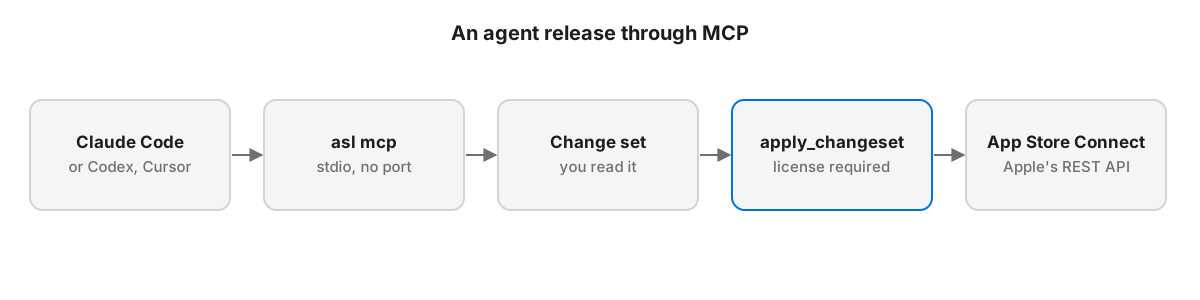
An MCP server lets an AI coding agent call App Store Connect the way it calls a compiler: by name, with structured arguments, and with JSON back. App Store Localization for Mac ships one inside its app bundle as asl mcp. The server signs requests with the API key stored in the macOS Keychain, so the agent never reads the .p8 file, and the client starts the server only when it needs it.
What is an App Store Connect MCP server?
An App Store Connect MCP server wraps Apple's App Store Connect REST API in named tools, such as list_apps or submit_for_review, that an AI client can discover and call. It speaks the Model Context Protocol, which Anthropic published as an open standard in November 2024 and which Claude Code, Codex and Cursor support.
The Model Context Protocol specification defines how a client lists a server's tools and calls them with JSON arguments. Anthropic announced it so that tools are written once and work in every client. For App Store Connect that replaces two worse options: an agent scraping the website, or an agent writing raw API calls and handling JWT signing, pagination and Apple's error codes itself.
asl mcp is a local stdio server: the client launches the binary and talks to it over standard input and output. Nothing listens on a network port, and the App Store Localization app does not need to be open.
How do you add the asl server to Claude Code?
Open App Store Localization for Mac, go to Settings, and connect the asl command to Claude Code, Claude Desktop, Codex, Cursor, VS Code, Windsurf or Gemini CLI with one click. Settings also installs the command at ~/.local/bin/asl, so the same tools are available from any terminal and any shell script.
To register it by hand in Claude Code, use the claude mcp add command:
claude mcp add asl -- "/Applications/App Store Localization.app/Contents/MacOS/asl" mcpCursor, Windsurf, Gemini CLI and Claude Desktop take the same command in this JSON shape. Codex uses TOML and VS Code a servers object, which Settings writes for you:
{
  "mcpServers": {
    "asl": {
      "command": "/Applications/App Store Localization.app/Contents/MacOS/asl",
      "args": ["mcp"]
    }
  }
}
Restart the client after adding it. Asking the agent to list your apps is a quick check: a list of names and Adam IDs means the key and the server both work.
Which App Store Connect tools does the server expose?
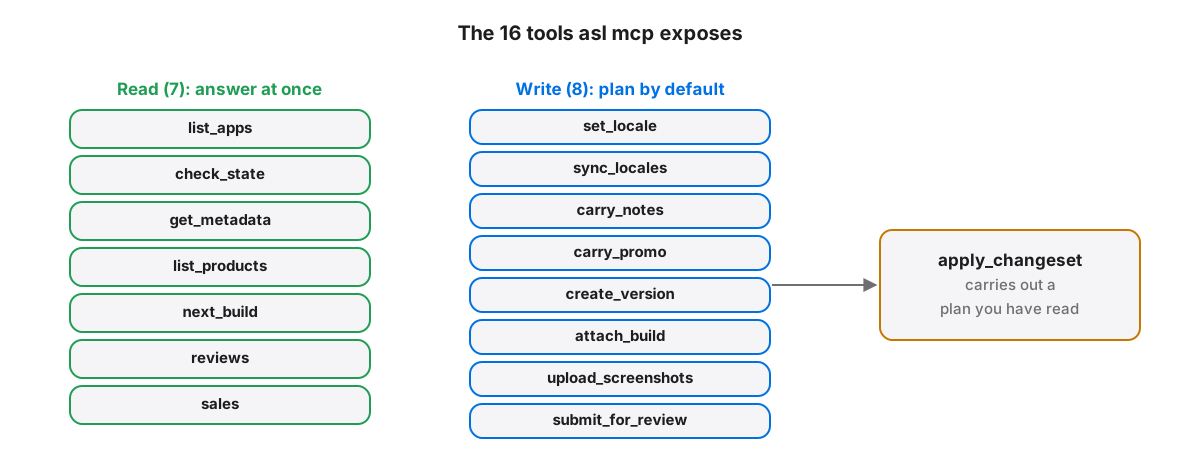
The asl MCP server exposes 16 tools. Seven read and answer at once: list_apps, check_state, get_metadata, list_products, next_build, reviews and sales. Eight write and, by default, return a plan, from set_locale to submit_for_review. The sixteenth, apply_changeset, carries out a saved plan.
The write tools cover a full release: create_version, set_locale, sync_locales for filling the next version's locales and restoring the ones that shipped, carry_notes and carry_promo for copying shipped text into blank locales, attach_build, upload_screenshots and submit_for_review. Pricing, offer codes and review replies are in the asl CLI's 51 commands, which an agent can also run from a shell with --json output.
Every tool returns the same envelope: ok, data, errors and log, with ok true exactly when errors is empty. An agent can branch on one field instead of parsing prose.
Why do agent writes come back as a plan first?
By default each asl write tool returns a change set listing every field's current value in App Store Connect and its proposed value. Nothing reaches Apple until apply_changeset runs with that change set's ID, so you read what the agent intends before a price or a listing changes.
Three tools also accept an explicit flag that writes at once: upload_screenshots with dry_run false, attach_build with apply true, and submit_for_review with submit true. Their defaults are a dry run or a read-only preflight, so tell the agent to leave those flags alone unless you want it to act without a second step.
Apply rereads each target and skips anything edited since the plan was made. A change set applies once, within 30 minutes, and only on the account and app that produced it. Without a license, write tools still return the full plan, marked license_required, so an agent can prepare a release that you apply later from the app.
Agents make plausible mistakes: a German description in the French locale, a build number from the wrong train. Keeping the approval step in the client catches those before customers see them.
What rate limits apply to the App Store Connect API?
Apple meters the App Store Connect API per hour and reports the quota in an X-Rate-Limit response header, which reads 3,600 requests per hour on the accounts we run. A large account can hit that limit during a full translation pass, so the asl server backs off on HTTP 429 with doubling delays.
Apple documents the rate limit headers rather than a fixed number, so read the header on your own account. Long lists are paginated throughlinks.next, and asl never returns a partial list as a success. Fan-out work, such as reading 175 territories of prices, runs in chunks to stay under the limit.
What can an agent still not do through the API?
Apple's public App Store Connect API cannot create a new app record or answer the App Privacy questionnaire, so neither an agent nor asl can. Apple also requires the first in-app purchase of each type to be submitted together with a new app version, so an agent cannot send that first product to review alone.
Apple sets that rule per product type: after the first product of a type is approved, later products of that type can go to review separately, as long as the app already has an approved version. App record creation and App Privacy details remain website tasks, and an agent that tries them through the API gets an error rather than a partial result.App Store Localization for Mac reads and plans every change for free; a one-time license applies them. macOS 26 or later.
Key takeaways
- asl mcp is a local stdio MCP server inside App Store Localization for Mac, with no network port.
- The API key stays in the macOS Keychain; the agent calls tools and never handles the .p8 file.
- Seven tools read; eight writes return plans by default, and apply_changeset carries a plan out.
- Apple's hourly quota reads 3,600 requests on our accounts, so backoff and chunking matter on big accounts.
- New app records and App Privacy answers are outside the API, and a first product of each type needs a version.
Frequently asked questions
Does the asl MCP server work without the app open?
Yes. The MCP client launches the asl binary from inside the App Store Localization app bundle when it needs a tool, and the binary reads the API key from the macOS Keychain itself. The Mac app's window does not have to be open, and no background process or network port stays running.
Can Codex or Cursor use the same MCP server as Claude Code?
Yes. Any client that supports local stdio MCP servers can launch asl mcp, including Codex, Cursor, VS Code, Windsurf, Gemini CLI and Claude Desktop. App Store Localization's Settings writes the configuration for each of them in its own format, JSON for most clients and TOML for Codex.
Can an agent submit an app for review on its own?
An agent can prepare a submission through the asl MCP server: create the version, fill locales and run submit_for_review, which by default is a read-only preflight. The version only goes to review when the tool is called with submit set to true, so tell the agent to stop at the preflight and submit yourself.