What does ENTITY_STATE_INVALID mean when you submit for review?
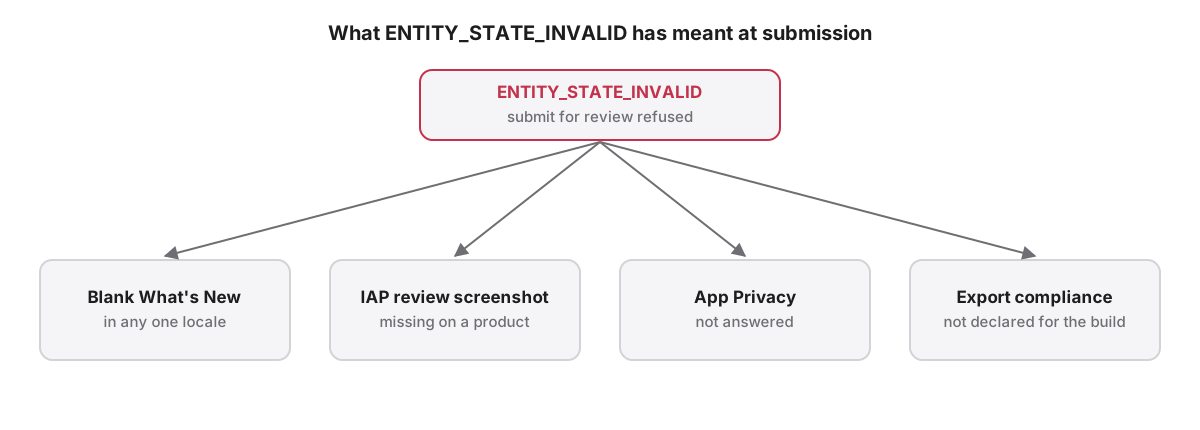
ENTITY_STATE_INVALID is the App Store Connect API's answer when a review submission lacks something Apple requires, and it rarely names what. In our releases it has meant one of four things: a blank What's New in any locale, an in-app purchase without its review screenshot, unanswered App Privacy, or missing export compliance.
ENTITY_STATE_INVALID means App Store Connect considers the version, or something attached to it, incomplete for review. The error body usually points at the submission rather than the missing field, so the fix is to check each requirement in turn. The four causes below are the ones we have hit while releasing a catalogue of more than 100 apps.
Which missing items trigger ENTITY_STATE_INVALID at submission?
Four missing items have produced ENTITY_STATE_INVALID when submitting an App Store version for review: a blank What's New in any locale of an update, an in-app purchase or subscription without its review screenshot, an unanswered App Privacy questionnaire, and a build without an export compliance answer.
Check them in order of how often they occur:
- What's New: every locale on an update needs release notes.
- Product review screenshot: each new in-app purchase or subscription needs one.
- App Privacy: the privacy details must be published.
- Export compliance: the build must declare its encryption use.
Why does one blank What's New block the submission?
App Store Connect requires What's New text in every locale of an app update, and a single blank locale blocks the whole submission with an error that names no locale. An app localized into 39 languages has 39 What's New fields, and adding a language late leaves its field empty.
The fast fix is to copy the shipped version's What's New into every blank locale, then translate properly on the next release. App Store Localization does this with asl carry notes, and its preflight lists blank locales by code before you submit. One locale that fails to save should never stop the loop over the others, or a single bad locale hides the rest.
Why is What's New rejected on a first release?
App Store Connect rejects What's New on an app that has never shipped on that platform, because there is no earlier version to describe. A first release is defined by having no live version on the platform, not by the version number, so a first macOS release of an existing iOS app counts too.
Tools that decide by version string get this wrong in both directions. Description text carries over to a new version automatically, but promotional text does not, so a new version can ship with blank promotional text unless something copies it across.
Name and subtitle live on the app information record, not the version, as Apple lists under app information. Writing them to the version localization fails.
Why must a first in-app purchase ship with a version?
Apple requires the first in-app purchase of each type, whether consumable, non-consumable, auto-renewable or non-renewing subscription, to be submitted together with a new app version. Each product also needs a review screenshot. Submitting the version without the product ships an app whose purchase cannot complete.
Apple documents the rule: once the first product of a type is approved, later products of that type can go to review alone, provided the app has an approved version. Subscriptions also sit under subscription groups rather than the in-app purchase list, so a tool that only reads in-app purchases misses them when checking what a submission contains.Which build problems show up at submission time?
Build problems at submission usually come from build selection, not the binary. Replacing an attached build directly returns HTTP 500 from App Store Connect; detach the old build first. Build numbers can repeat across version trains, so a lookup must be scoped to the version being submitted.
Export compliance is answered per build. Setting ITSAppUsesNonExemptEncryption in Info.plist answers it at upload; otherwise App Store Connect asks, and an unanswered build cannot be submitted. Apple explains the export compliance rules. Freshly uploaded builds can take several minutes to appear in the API.
A different error, STATE_ERROR on a metadata write, means the version is locked for review or release. Stop writing locales when it appears; retrying each locale only repeats the refusal.
How do you find the cause before you submit?
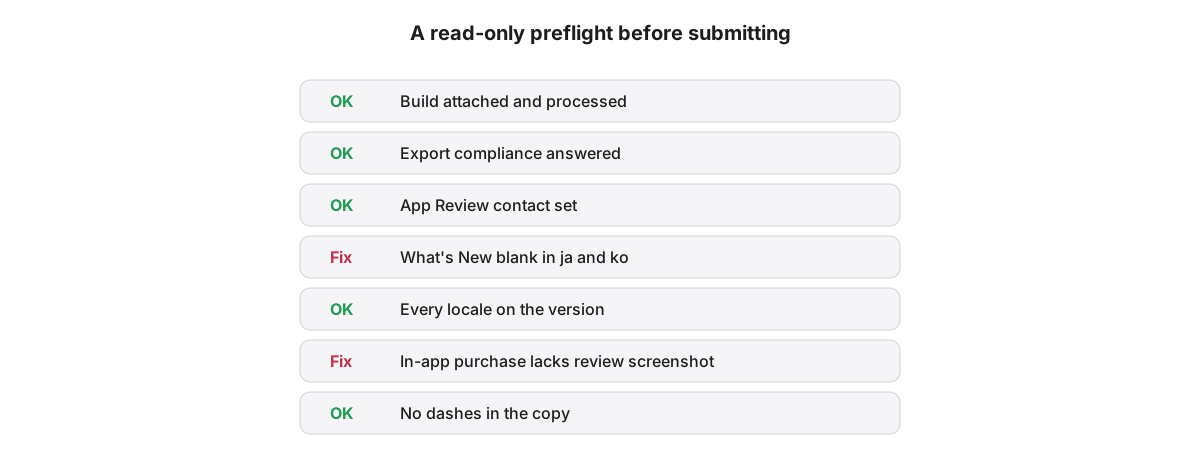
Run a read-only preflight before submitting: confirm the build is attached and processed, export compliance is answered, the App Review contact is set, every locale has What's New, and every new product has a review screenshot. Each item that fails can then be fixed by name instead of guessed.
App Store Localization's preflight, in the app or as asl preflight MyApp, reads and changes nothing, and also flags dashes in your copy for teams that ban them. Run it again after fixing, then submit.
App Store Localization for Mac reads and plans every change for free; a one-time license applies them. macOS 26 or later.
Key takeaways
- ENTITY_STATE_INVALID points at the submission, not the missing field, so check each requirement in turn.
- One blank What's New in any locale of an update blocks the whole submission.
- A first release on a platform rejects What's New, whatever its version number says.
- The first in-app purchase of each type must ship with an app version and needs a review screenshot.
- Detach an attached build before attaching another; a direct replacement returns HTTP 500.
Frequently asked questions
What does ENTITY_STATE_INVALID mean in App Store Connect?
ENTITY_STATE_INVALID means App Store Connect considers an item in the submission incomplete for App Review. In practice it has meant a blank What's New in some locale, an in-app purchase missing its review screenshot, unanswered App Privacy questions, or a build without an export compliance answer. The error rarely says which.
Do I need What's New text for every language?
Yes, for an update. Every locale on an App Store version update needs What's New text, and one blank locale blocks submission. The exception is an app's first release on a platform, where App Store Connect rejects What's New entirely because there is no earlier version to describe.
How do I answer export compliance for every build?
Add the ITSAppUsesNonExemptEncryption key to your app's Info.plist, set to false when the app uses only exempt encryption such as HTTPS. Each uploaded build then carries its answer, and App Store Connect stops asking. Apps using non-exempt encryption need the documentation Apple describes for export compliance.