Why is my build not showing in App Store Connect?
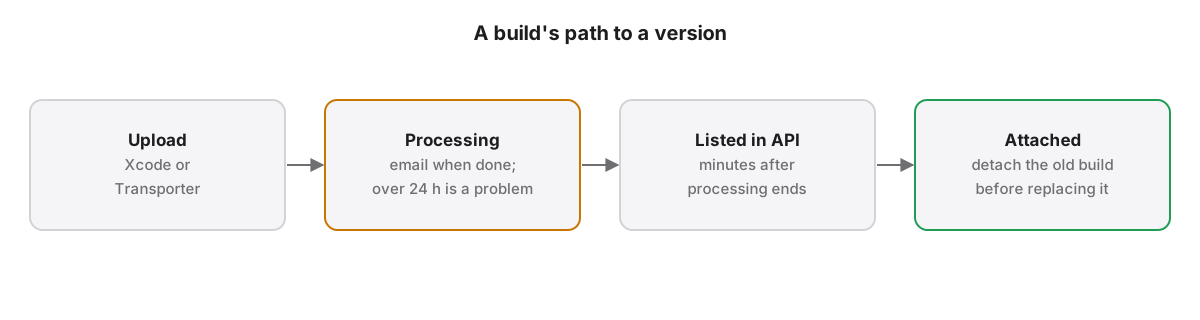
A new build first sits in Processing, and Apple emails you when it completes; only then can it be attached. Processing past 24 hours signals a problem. Through the API a new upload can take minutes to list, numbers are scoped per platform, and on iOS per version train, and an attached build must be detached before another replaces it.
A missing build is usually a timing or scoping issue rather than a failed upload. App Store Connect processes every upload before it can be used, lists builds per platform, and lets the same build number exist in several iOS version trains. Check those three things in order before suspecting the upload.
How long does a new build take to appear?
A build uploaded to App Store Connect enters the Processing state and cannot be attached until it finishes. Apple sends an email when processing completes or fails. Apple's guidance says a build still processing after 24 hours may have an issue worth raising with support.
Statuses and emails are described in Apple’s builds page. Through the API, our releases see a freshly uploaded build appear about three minutes after upload, so a script that uploads and immediately looks for the build will miss it. Poll for a few minutes before treating the build as lost.
Why does the build list show the wrong builds?
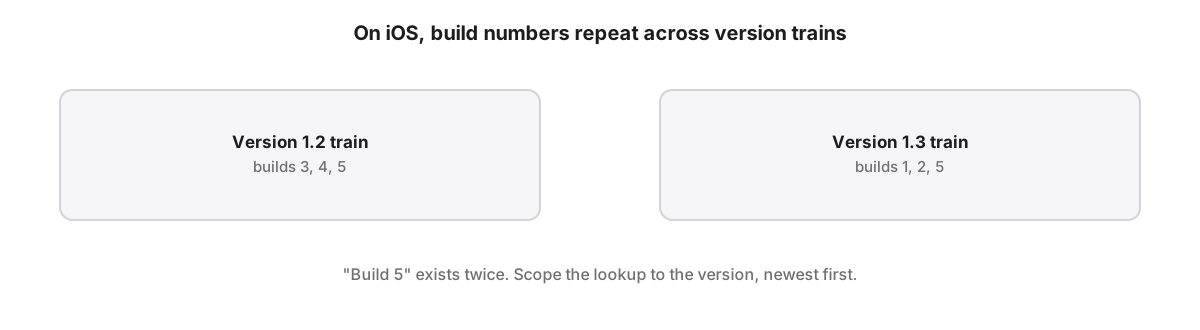
App Store Connect keeps iOS and macOS versions of one app under the same Apple ID, and builds are numbered per platform. On iOS, build numbers can repeat across version trains, so build 5 of 1.2 and build 5 of 1.3 are different builds; on macOS they must keep increasing. Filter by platform first.
In the API, version lookups need a platform filter, and build lookups filter on the pre-release version's platform. Expired builds still count when App Store Connect decides which number comes next, which is why a number that looks free can be refused.
Why won't App Store Connect attach the build?
App Store Connect attaches a build only to a version in an editable state, and only one build at a time. Replacing an attached build directly through the API returns HTTP 500; detaching the current build first and then attaching the new one works. A build without export compliance cannot be submitted.
Export compliance is answered per build, either in App Store Connect or with the ITSAppUsesNonExemptEncryption key in Info.plist, as Apple’s export compliance overview explains. A version that already waits for review can still take metadata edits but cannot change its build until it is pulled back.
Why did a build disappear after release?
Apple states that some builds may no longer appear in App Store Connect after the app is released. Builds also expire for TestFlight after 90 days. Neither changes the next allowed build number, which App Store Connect still computes from every build ever uploaded for that platform.
Keep your own record of build numbers per release, or read the highest number from the API, rather than trusting what the web page lists. App Store Localization for Mac answers this with asl next-build, which returns the next number App Store Connect will accept.
App Store Localization for Mac reads and plans every change for free; a one-time license applies them. macOS 26 or later.
Key takeaways
- Wait for processing to finish and the email to arrive before looking for a new build.
- Through the API, expect a new upload to take a few minutes before it is listed.
- Filter builds by platform, and on iOS by version train, where the same number can repeat.
- Detach the current build before attaching a replacement, or the API returns HTTP 500.
- Expired and hidden builds still count when App Store Connect picks the next build number.
Frequently asked questions
How long does App Store Connect take to process a build?
Apple does not publish a typical processing time, but it emails you when processing completes or fails, and its guidance treats a build still processing after 24 hours as a possible issue. Until processing completes, the build cannot be attached to a version or tested in TestFlight.
Why does App Store Connect say my build number is already used?
App Store Connect compares the build number with every build uploaded for that platform, within the version train on iOS and across all versions on macOS, including expired builds and builds no longer listed after release. Pick a number higher than the highest one ever uploaded, or read it from the API instead of the web page.
Can I attach a different build after submitting for review?
Not while the version waits for review or is in review. Remove the version from review first, which returns it to an editable state, then detach the old build and attach the new one. Metadata can still be edited while the version waits for review.