How do you translate App Store metadata with AI within limits?
Translate App Store metadata with a language model, then enforce Apple's limits in code instead of trusting the prompt. Count Unicode characters, not bytes. Trim keywords at a whole keyword, cut promotional text at a word, and skip a description that runs past 4,000 characters, because Apple rejects the whole update.
Translating App Store metadata with AI works when the model writes and code enforces. Claude and GPT models translate descriptions and release notes well, but they count tokens rather than characters and treat a stated limit as a suggestion. Every field therefore needs a check after the model answers, and each field needs its own rule for what happens when the check fails.
What are the App Store character limits per field?
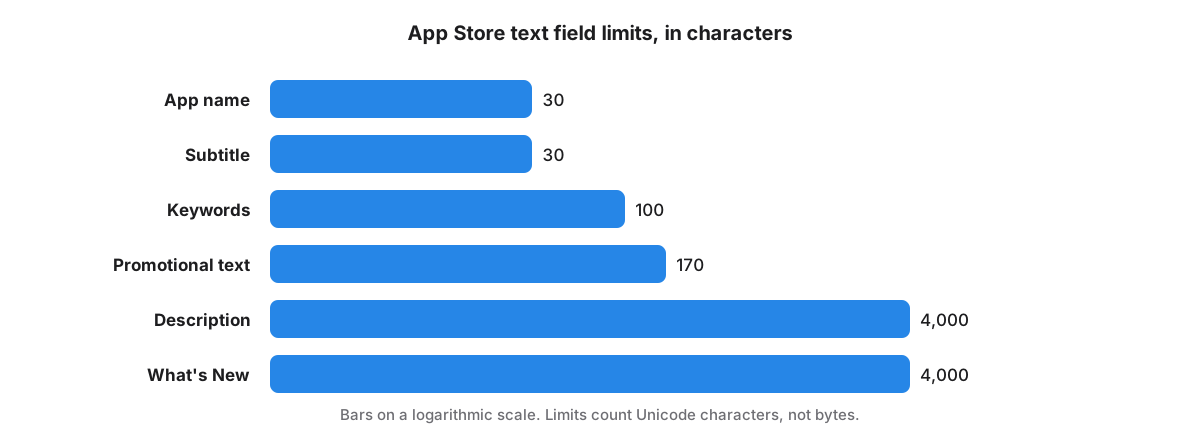
App Store text fields have fixed limits counted in characters: app name 30, subtitle 30, keywords 100, promotional text 170, description 4,000 and What's New 4,000. Each locale has its own copy of every field, so a listing in all 50 App Store languages carries 300 limited fields.
Apple lists the limits under platform version information and app information. A developer reply to a review is capped too, at 5,970 characters in our testing. Limits count Unicode characters, so a Japanese or Chinese character costs one, not the three bytes it takes in UTF-8. Apple's reference page describes the keyword field as 100 bytes, yet App Store Connect holds a live Japanese keyword field of ours at 97 characters and 257 bytes. A byte-counting check would have rejected it.
Why do language models break App Store character limits?
Language models break App Store character limits because they generate tokens and cannot count characters reliably while writing. German compounds and Romance languages also run longer than English. Batch prompts make it worse: asked to translate a long description into eight locales at once, models start summarising.
App Store Localization sends eight locales per model call, which takes about six seconds; larger batches risk timeouts and the output cap. Because batch output drifts toward summaries, the app never overwrites a description that already holds text with a batch translation. A field over its limit is asked for again once, then trimmed by rule.
Name and subtitle are left as written. They carry the brand and the highest-weight keywords, which deserve a per-market decision rather than a translation.
How should a translated keyword field be trimmed?
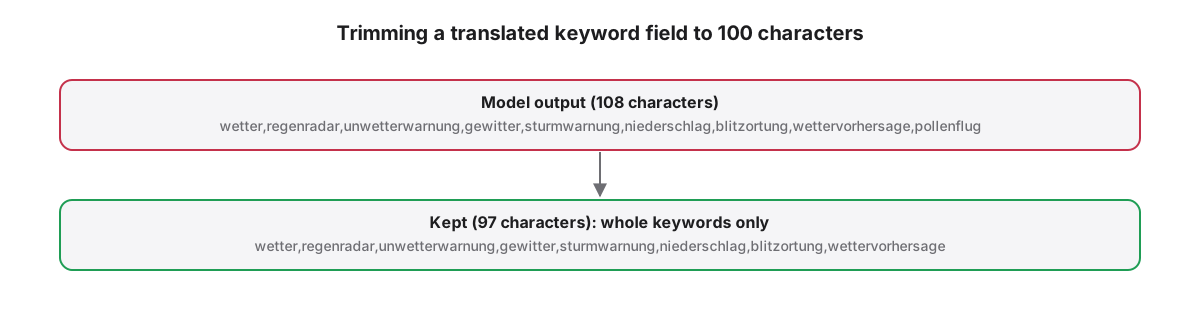
Trim a translated keyword field by splitting on commas and keeping whole keywords, in order, while the total stays within 100 characters including commas. Stop at the first keyword that does not fit. Cutting mid-keyword leaves a fragment that wastes characters and can match unrelated searches.
Promotional text gets a different rule: cut at 170 characters, back up to the last space, and strip trailing commas, periods, semicolons and colons. A sentence fragment there is visible to users, so a clean word boundary matters more than the last few characters. Order keywords by priority in en-US so trimming drops the least valuable ones.
What happens when a description runs past 4,000 characters?
A description over 4,000 characters makes App Store Connect reject the request that carries it, and that request also carries What's New. Truncating breaks the description mid-sentence, so drop the over-long description from the update, save What's New, and translate the description again separately.
Description and What's New for one locale go to App Store Connect in the same write to the version localization. One field over its limit fails both, and a tool that does not check first loses the release notes along with the description.
Which locale codes does App Store Connect accept?
App Store Connect uses its own locale codes, which differ from many published lists: ca, cs, da and it rather than region-qualified forms, and zh-Hans and zh-Hant for Chinese. A tool built on a generic list will try codes Apple rejects and miss ones Apple accepts.
Take the codes from Apple's list of App Store localizations. In the prompt, name the language in full: Simplified Chinese for zh-Hans, Brazilian Portuguese for pt-BR. A prompt that says only Chinese can put Simplified characters into the Traditional locale; the original server shipped exactly that in a cached legal footer for zh-Hant.
Keyword strategy per market is a separate job; see how to localize App Store keywords.
App Store Localization for Mac reads and plans every change for free; a one-time license applies them. macOS 26 or later.
Key takeaways
- Let the model translate and let code enforce limits; prompts alone do not hold a 100-character cap.
- Count Unicode characters, not bytes, or valid Japanese and Chinese keywords fail the check.
- Trim keywords at whole keywords and promotional text at a word boundary.
- Skip an over-long description instead of truncating it, or the shared write also loses What's New.
- Use Apple's own locale codes and full language names such as Simplified Chinese in prompts.
Frequently asked questions
Can ChatGPT or Claude translate App Store descriptions well?
Yes, for descriptions, release notes and promotional text, provided code checks every field afterwards. Claude and GPT models write natural copy in all 50 App Store languages, but neither reliably respects character limits. Translate in small batches, check lengths in code, and keep a filled description rather than replacing it with a batch output.
Should App Store keywords be translated directly?
No. Translated keywords are a starting point, not a strategy, because people in each market search with their own terms. Translate to get candidates, keep whole keywords within 100 characters, then check search demand per locale. The app name and subtitle deserve the same per-market decision.
Do App Store character limits count bytes or characters?
Characters. App Store Connect counts Unicode characters, so the 100-character keyword field holds 100 Japanese characters even though each one takes three bytes in UTF-8. Length checks written with byte counts reject valid Japanese, Chinese and Korean metadata and should count characters instead.