Promotional text vs description: what is the difference?
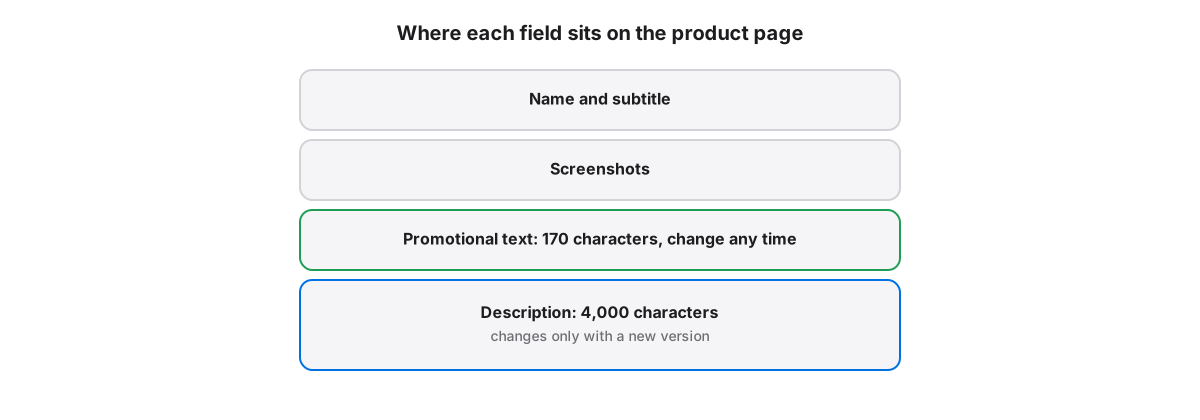
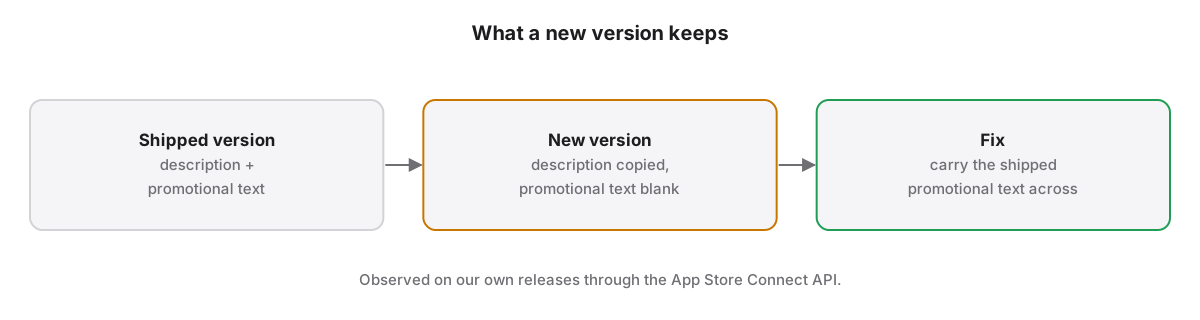
Promotional text is a 170-character field above the description that you can change at any time without submitting a new version, and it does not affect search ranking. The description holds up to 4,000 characters and changes only with a new version. In our releases, a new version copied the description but not promotional text.
Promotional text and the description share the product page but follow different rules. One is a short banner you can rewrite between releases; the other is the long-form pitch locked to a version. Using each for its own job, and knowing which one survives a new version, keeps every locale's listing complete.
What do promotional text and description each allow?
Promotional text holds up to 170 characters and appears above the description on devices running iOS 11 or later. The description holds up to 4,000 characters of plain text, with line breaks but no HTML. Both are localized per language, and both are visible to every visitor of the product page.
| Field | Limit | Change without a new version | Affects search ranking |
|---|---|---|---|
| Promotional text | 170 characters | Yes | No, per Apple |
| Description | 4,000 characters | No | Apple advises against keyword stuffing it |
Limits come from Apple’s platform version information.
When can you change App Store promotional text?
App Store promotional text can be changed at any time without submitting a new version, which makes it the field for sales, events and news. Apple's product page guidance suggests using promotional text for updates you want to share more often than you release new versions.
The guidance is on Apple’s product page page. Custom product pages carry their own promotional text too, so a campaign page can say something different from the default page without touching the main listing.
Does promotional text help App Store search?
Apple states that promotional text does not affect an app's search ranking and should not be used to display keywords. The fields that carry search weight are the app name, subtitle and keyword field. Write promotional text for the person already reading the page.
Apple also advises against adding unnecessary keywords to the description to improve search results. Ranking work belongs in the keyword field, which is covered in how to localize App Store keywords.
What does a new version keep from the old one?
In our releases through the App Store Connect API, a new version copied the description from the version before it but left promotional text blank. Across many locales that leaves a gap at the top of the listing in every language until someone fills it again.
App Store Localization for Mac checks for this and can carry the shipped promotional text into every blank locale of the new version, falling back to the shipped en-US text where a locale had none. It only fills blanks, so new copy written for the release is never overwritten.
App Store Localization for Mac reads and plans every change for free; a one-time license applies them. macOS 26 or later.
Key takeaways
- Promotional text: 170 characters, editable any time, no effect on search ranking.
- Description: 4,000 characters of plain text, editable only with a new version.
- Use promotional text for sales, events and news between releases.
- Keep keywords in the name, subtitle and keyword field, not in either of these fields.
- Check promotional text in every locale after creating a new version; it can arrive blank.
Frequently asked questions
Does changing App Store promotional text require review?
No. Promotional text can be changed at any time without submitting a new app version, which is why Apple suggests it for frequent updates. The change still has to follow the App Review Guidelines, so avoid claims you could not support, and localize it for each language your listing uses.
How long can App Store promotional text be?
Promotional text can be up to 170 characters per locale. It appears above the description on the product page for devices running iOS 11 or later. Keep the most important words early, because the field is short and some languages need more characters than English for the same message.
Can I change the App Store description without a new version?
No. The description can only be changed when you submit a new version of your app. If you need to announce something between releases, put it in promotional text, which updates without review, and fold it into the description at the next version.